

Virtual tour of the SyPly booth at the MosBuild-2022 exhibition
An interactive 3D tour of the property. Matterport.
About the project
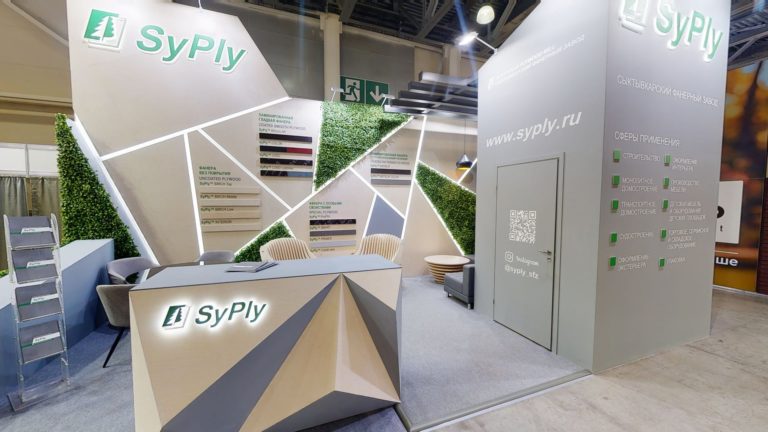
Would you like to see SyPly's stand at MosBuild-2022? It could not be easier. We digitised it to create a 3D tour you can access anytime, from anywhere in the world. Simply follow the link to explore the exhibition stand of one of the market leaders. Walk around the SyPly stand, examine every detail and discover its design and product displays. Explore every corner, study the layout and get up close to the displays to see how they looked in person. It is a great opportunity to catch up if you missed the exhibition or revisit it if you attended. The virtual tour by 360°Space is more than a collection of panoramas: it is a fully interactive model created using Matterport technology. You can move freely through the space and access additional information about the products and services on display. Go beyond static photo reports and discover the possibilities of 3D.
Format and result
Interactive presentation
Matterport. Explore the property in the published tour.
Project scope
The work, materials and handover are agreed for your task.
For a similar task
Discuss the audience, format, materials and viewing method. Scope and handover are set out in the proposal.
Where is the object located?
The location listed in the case is shown on the map. Travel feasibility, access and scheduling are discussed for the specific property.
What to discuss for a similar project
Task and audience
What should be shown and which action is expected from the visitor.
Content
What source materials already exist and what needs preparing.
Viewing method
Where the result will be available and which devices should be tested.
Handover and updates
Which materials, access and rights the customer needs after acceptance.
Frequently asked questions
What should I send for an estimate of a similar project?
Describe what you want to show, who it is for and where people will access the result. For a space, a floor plan, area and photographs are useful; for a product, send images, dimensions or existing models. Include any available materials and your preferred launch date so the scope of filming, content preparation and development can be defined.
How can we use the finished project on our website and other channels?
Publication depends on the format: an interactive project opens through a link or an embedded player, while video can be shared as a file or through a video service. Separate clips and images linking to the full experience can be prepared for social media. It is best to choose the channels and content versions before production.
What does project handover and ongoing support include?
The handover list specifies the finished materials, access details, instructions and terms of use. Source files, third-party licences and hosting are listed separately so editing options and future costs are clear. Support may include content updates, backups and further development; its scope depends on the chosen solution.
Similar Projects
Discuss a similar project
Leave a contact and describe the task to discuss scope and terms